

Getting Started
Printing at home can feel tricky, especially when you want your photos or artwork to look as good on paper as they do on screen. With inkjet printers like Canon’s PIXMA and imagePROGRAF series, the combination of high-quality ink and the right paper makes a huge difference. Whether you’re a photographer or artist, beginner or experienced, these tips will help you get professional-quality prints from your Canon inkjet printer.
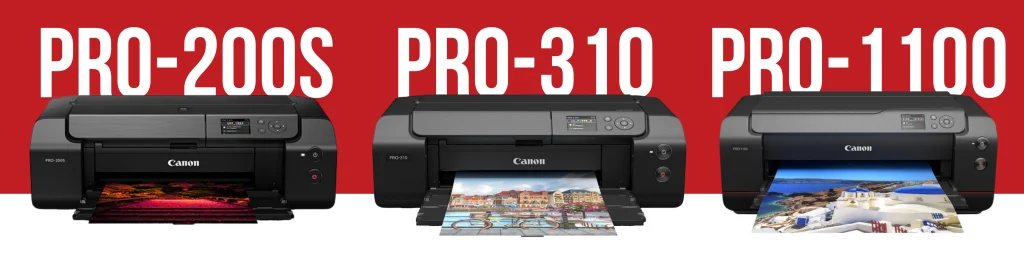
Canon offers a range of desktop printers to suit different needs:
- Canon PRO-200S: Best for glossy papers. Makes colours look bright and punchy.
- Canon PRO–310: Works well on art papers. Gives sharper detail and longer-lasting prints.
- Canon PRO-1100: Built for top-quality papers. Delivers the best depth, blacks, and overall print quality.
Using the right paper for inkjet printing is critical. PermaJet papers are designed to work seamlessly with Canon printers, ensuring your prints have crisp detail, vibrant colour, and lasting quality.
Why Your Canon Printer Can Do More Than You Think
Canon inkjet printers are capable of producing stunning, high-quality prints at home, especially when paired with papers designed for inkjet technology. PermaJet papers enhance the printer’s capabilities by optimising ink absorption, colour gamut, and print longevity.
Key strengths of Canon inkjet printers:
- Wide colour gamut – reproduces colours accurately for both photography and digital art
- High-resolution print heads – capture fine detail and subtle textures
- Flexible paper support – works seamlessly with fine art inkjet papers like PermaJet
Practical Tips for Snappy Results
Getting high-quality prints from your Canon inkjet printer doesn’t have to be complicated. A few focused adjustments can make a noticeable difference, especially when combined with PermaJet papers.
Key tips for consistent, vibrant prints:
- Pick the right paper in your driver – Canon printers need to know the paper type to control ink flow and droplet placement. This affects sharpness, colour saturation, and drying time.
- Use the correct ICC profile – Profiles match your printer, ink, and paper. Using the right one ensures colours are accurate and consistent with your screen.
- Turn off double colour management – Only let either Photoshop/Lightroom or the printer driver handle colour. Double management can cause washed-out or oversaturated prints.
- Choose appropriate print settings – For high-detail images, select higher resolution and the correct paper type. For casual prints, standard settings save ink without losing quality.
- Handle paper carefully – Avoid touching the printable surface and let prints dry fully to prevent smudging or streaks.
- Experiment and take notes – Keep track of settings that work best with your printer and chosen paper. Small tweaks can significantly improve results over time.
These steps ensure your Canon inkjet printer consistently produces professional-quality prints, whether you’re working on portraits, landscapes, or digital art.

Choosing the Right Paper
Not all papers are the same, and with inkjet printing, the right paper makes a bigger difference than most people realise. PermaJet papers are designed specifically for inkjet printers like Canon’s PIXMA and imagePROGRAF series, delivering accurate colour, crisp detail, and lasting prints.
Why it matters for inkjet:
- Coatings control ink spread – prevents colours from bleeding and keeps edges sharp
- Paper weight and texture – heavier, textured papers enhance depth and vibrancy
- Archival quality – ensures prints last for decades without fading
Popular PermaJet options for Canon printers:
- Portrait Rag 305 – smooth, bright white, ideal for detailed portraits
- Oyster 271 – lightly textured, warm tone, perfect for landscapes or digital artwork
- Museum Heritage 310 – heavyweight archival paper, designed for prints you want to last
- Baryta Rag 310 – glossy baryta surface, perfect for black-and-white photography or high-contrast images
Pro tip: Using PermaJet papers with your Canon printer ensures even ink distribution and vibrant colours without the need for repeated test prints. The papers are optimised to match Canon’s ink formulation and print head precision, so your workflow is smoother and results are more consistent.

Canon & PermaJet: A Winning Combination
Canon printers deliver reliable, high-quality prints, and using PermaJet papers ensures your results are consistent, vibrant, and long-lasting. The combination of Canon’s precise inkjet technology and papers designed for optimal ink absorption gives every print professional-quality colour and detail.
Why this works so well:
- Inkjet-optimised papers – PermaJet papers control ink spread, ensuring sharp edges and consistent colours
- Seamless Canon compatibility – Profiles and paper types are matched to Canon printers, reducing the need for trial and error
- Versatile results – Whether printing portraits, landscapes, or digital artwork, the printer and paper combination handles it all reliably
Pro tip: Double-check that your Canon driver matches your PermaJet paper profile. On models like the PIXMA PRO-200S and imagePROGRAF PRO-310, this alignment maximises colour accuracy and tonal range across the entire print.
Canon printers provide the capability, and PermaJet papers unlock their full potential. Together, they give artists and photographers confidence that their prints will match their creative vision.
Need 1-to-1 help?Our expert team can provide a 1 hour or half hour lifeline chat, giving you personalised guidance on everything from colour management to choosing the right PermaJet paper for your prints.
For further details, explore our PermaJet guides, for clear advice on ICC profiles, printer settings and paper choice, helping you achieve consistent, reliable results.